Gemini is four surfaces, not one
Every "how to optimize for Gemini" checklist that treats the product as a single target misses the part that determines whether the checklist even applies. Four surfaces carry the Gemini name, and each one decides differently whether to include your brand.
| Surface | What triggers it | Who sees it | What earns inclusion |
|---|---|---|---|
| Gemini app / assistant | A direct prompt in the app or on gemini.google.com | Users who deliberately chose an AI assistant over search | Grounded web content plus training-time entity accuracy |
| Gemini in Google Workspace | Prompts inside Gmail, Docs, Sheets, Slides | Business users working inside their own documents and inbox | Your presence in the user's own data, not public content |
| Google AI Overviews / AI Mode | A regular Google search, now running on Gemini 3 | The full Google Search audience, thousands of times larger | Query fan-out retrieval across the organic index and beyond |
| Gemini API in third-party apps | Whatever the host app builds on top of the API | Users of that specific product, not Google's audience | Whatever grounding tool and data sources the host app wires up |
The practical consequence: a page that wins citations in the Gemini app for a factual question can be entirely absent from AI Overviews for the same question, because AI Overviews retrieves through Google's full-index query fan-out while the Gemini app's grounding tool may generate a narrower set of searches for the same prompt. We cover the AI Overviews side of this specifically in our breakdown of Google AI Mode's May 2026 core update, which is worth reading alongside this guide rather than instead of it, since the two surfaces reward overlapping but not identical signals.
How Gemini decides whether to search at all
This is the step most Gemini optimization advice skips entirely. When a prompt reaches Gemini with its Google Search tool enabled, the model first analyzes whether a search would improve the answer, and only generates and runs queries if it decides the answer benefits from current web information (Google AI for Developers). Google has not published the exact scoring mechanism behind that decision, but the behavior is consistent: simple factual questions the model already "knows" from training are frequently answered without a search call at all.
That single design choice splits Gemini optimization into two disconciled tracks:
- Retrieval-time visibility. For prompts Gemini decides to ground, your content needs to be crawlable, current, and structured so it survives the retrieval and synthesis step. This is the track every GEO checklist addresses.
- Training-time visibility. For prompts Gemini answers from parametric knowledge, no amount of on-page optimization today changes the answer. What matters is whether your brand had a broad, accurate, consistent presence across the web, Wikipedia, review sites, and structured data sources before the model's last training cutoff.
Most brands only work the first track. That leaves them invisible on the ungrounded, "tell me about X" style prompts where Gemini answers instantly from memory, with no citations to influence and no retrieval step to win. The fix is not a content trick. It is making sure your entity data, the same signals covered in our guide to brand entity optimization for AI search, is accurate and consistent enough that it gets absorbed correctly the next time a model trains.
What earns a citation once Gemini does search
When Gemini grounds an answer, it does not hand off to a single search and read the top result. It generates one or more Google queries, often decomposing a complex prompt into narrower sub-queries (a pattern commonly called query fan-out), then synthesizes across the returned pages and attaches source citations to the specific claims they support (Google AI for Developers).
Because AI Overviews now runs on the same Gemini 3 model, the clearest public data on this retrieval behavior comes from Ahrefs' analysis of AI Overview citations across 863,000 keyword SERPs and roughly 4 million cited URLs. It found only about 38% of AI Overview citations now come from the top 10 organic results for the query, down sharply from around 76% a year prior.
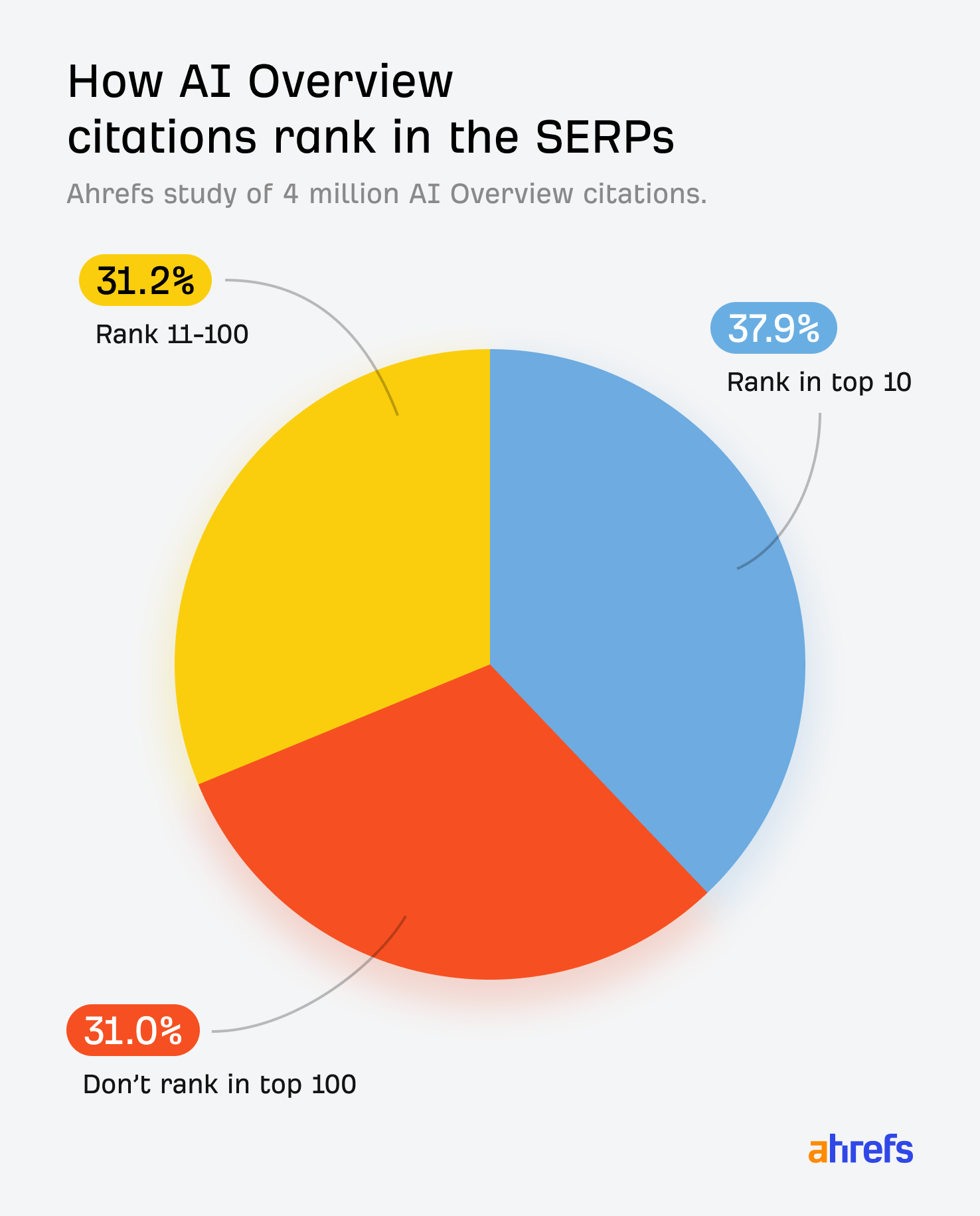
The implication for anyone asking how to optimize for Google Gemini through the AI Overviews surface: ranking first no longer functions as a proxy for getting cited. Query fan-out means Gemini is pulling sources for sub-questions your page never directly targeted. Build pages that answer the adjacent questions around your main topic, not only the head term, so you have a candidate answer ready for whichever sub-query the fan-out step generates.
Connected apps changed what "content" even means for Gemini
The Gemini app also reaches into Google Maps, Flights, Hotels, YouTube, and Google Workspace through what Google now calls Connected Apps. As of October 2025, these public-data integrations activate automatically from a natural-language prompt. Users no longer need to type "@Google Maps" or "@YouTube" for the app to pull in that data; mentioning what they want is enough (9to5Google).
That shift matters for brand visibility because it means a meaningful share of what Gemini surfaces about your business never touches your website at all. A prompt like "find a hotel near downtown with a pool" pulls from Hotels and Maps data, not a blog post. A "how do I do X" prompt with a video answer available pulls from YouTube. The practical work here overlaps with local and platform SEO more than with article writing:
- Keep your Google Business Profile complete, verified, and free of conflicting category or hours data.
- Maintain accurate structured listings anywhere Gemini's connected apps draw from (Maps, Hotels, Flights where relevant to your category).
- Publish video content on YouTube for procedural and product questions in your category, since it is one of the sources the app can pull in directly.
A practical build for Gemini visibility
Put the two tracks together and the build order looks like this:
- Fix entity accuracy first. Confirm your Knowledge Panel, Google Business Profile, and Wikipedia or Wikidata entry (if you have one) state your brand's name, category, and facts the same way everywhere. This is the training-time track and the one most teams skip.
- Write for the sub-question, not only the head term. Structure pages so each section answers one specific question in a self-contained passage, because query fan-out retrieves at the sub-query level.
- Add the structured data that supports retrieval. Organization, Product, FAQ, and Article schema help Gemini's retrieval step parse and trust a page quickly, though it is a support signal, not a substitute for a clear, factual answer.
- Cover the platforms Connected Apps read from. A current Business Profile and an active YouTube presence now function as ranking surfaces in their own right for Gemini.
- Refresh time-sensitive pages. Retrieval-time visibility favors current information, especially on the AI Overviews surface where fan-out queries often target recent developments.
Measuring whether it is working
Track the Gemini app and Google AI Overviews as separate prompt sets, since they retrieve differently even on the same underlying model. Run a fixed list of prompts your buyers would realistically ask, log whether your brand appears, and note whether the citation came through search grounding or an app answered without any source at all. That last detail tells you which track, retrieval or training, is doing the work. Our framework for tracking brand mentions in AI search covers the prompt taxonomy and cadence in more depth, and our free AI Visibility Report benchmarks where your brand currently stands across Gemini and the other assistants so you can see which track needs the work first.
Frequently asked questions
Is optimizing for Gemini the same as optimizing for Google AI Overviews?
Not entirely. Both now run on the Gemini 3 model, but AI Overviews retrieves through Google's full search index at search volume, while the standalone Gemini app grounds a narrower, more conversational set of queries. Build for both, but measure them as separate surfaces since citation results diverge even on identical prompts.
Does Google Business Profile affect Gemini's answers?
Yes, particularly for local, product, and comparison prompts. Gemini's Knowledge Graph grounding and its Connected Apps for Maps and Hotels draw directly from verified business data, so an incomplete or outdated profile limits what the assistant can say about you accurately, independent of anything on your website.
Do I need schema markup to optimize for Google Gemini?
Structured data helps Gemini's retrieval step parse and confirm entity details faster, which supports both the app and AI Overviews. It is not a standalone lever, since Gemini still generates an answer from the clearest available passage. Treat schema as a support layer under clear, factual writing, not a replacement for it.
Why does Gemini sometimes answer without citing any source?
Because Gemini decides per prompt whether a Google Search would improve its answer, and for questions it can answer confidently from its own training, it often skips the search step entirely. That means content optimization has no effect on that specific answer. The lever there is training-time entity accuracy across the web, not on-page changes.
Where to start
Split your Gemini work into the two tracks this guide covers: confirm your entity data is accurate everywhere a model might learn it, then rebuild your highest-intent pages around the sub-questions Gemini's query fan-out is likely to generate. Check your Google Business Profile and YouTube presence, since Connected Apps now pull from both automatically. Then measure the Gemini app and AI Overviews as separate prompt sets, because a shared model does not mean a shared result.